5 files
-
mIRC-Scripting-Language-for-Sublime-Text
By noone
mIRC-Scripting-Language-for-Sublime-Text
Updated for mIRC 7.52 (April 2018) Reviewing mIRC 7.54 (December 2018)
This project implements syntax highlighting and autocompletion for mIRC msl. It currently supports:
All /Commands
All $Identifiers
All on EVENTs
Goto Loop highlighting
Popups
#Groups
Comments (; and /*)
@Windows
Numerics
User Variables
Params ($1, $2, etc)
Operators (ison, iswm, $+, >=, <=, etc)
Logic (if, else, while, etc)
This project aims to make Sublime Text the premier choice for developing mIRC msl. If you encounter any problems, please create an issue.
Highlighting
Highlighting currently supports all commands and identifiers in mIRC. In addition "on/ctcp/raw events" will also highlight. I try to cover all cases including: commands on new line, commands inline, commands after a |, commands after a {, etc. I welcome any suggestions for improvement.
Auto Completion
Autocomplete will work for all /commands and $identifiers. They will display in the autocomplete popup. Additionally, I have added support for tabbing through the full syntax of /commands through /color (alphabetical). I am adding support for more and hope to support displaying the full syntax of all remaining commands and identifiers in the future.
Installation
Option 1 (Package Control)
This package is now available in Package Control. If you have Package Control installed:
Ctrl+Shift+P
Install Package
mIRC Scripting Language (Highlight and Autocomplete)
Option 2 (Manual)
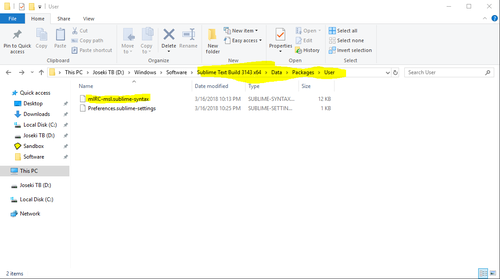
Copy mIRC-msl.sublime-syntax to Sublime\Data\Packages\User folder.
Copy mIRC-msl.sublime-completions to Sublime\Data\Packages\User folder.
You may need to create the Packages\User folder.
Theme Support
A slightly modified theme has been provided in the Extras folder that supports all features of the highlighter. Themes should support the following scopes to support all styles of this highlighter:
comment.line.double-slash
constant.numeric
constant.numeric.line-number.find-in-files
entity.name.class
entity.name.function
entity.name.tag
Keyword.control
keyword.operator
punctuation.definition.comment
string
variable.parameter
Please see the provided theme to see all implemented features. If you prefer to use another theme, file an issue and I'll see if I can modify the theme to work. Additionally, you can use the following to modify it yourself or create a new one: https://tmtheme-editor.herokuapp.com/#!/editor/theme/Monokai
Bugs
Let me know if you find any bugs by submitting an Issue.
IRC Support
#Computers @ EFNet
#mIRC @ EFNet
Special Thanks
Peace and Protection Script - Lots of complex code from this project that I use to test the highlighter.
2 downloads
(0 reviews)0 comments
Submitted
-

MScripter
By noone
This is an IDE and validator for mIRC scripting. At this point, it's still very much a work in progress, and may crash a lot.
Features:
Customisable syntax highlighting for mIRC remote, alias and popup scripts
Error checking for mIRC scripts
Synchronisation with running mIRC instances
Variable matching (when the cursor is on a variable, highlights other uses of it)
Hash table editor
Dialog table designer
4 downloads
(0 reviews)0 comments
Submitted
-

language-msl
By noone
mIRC Script Language Syntax for Linguist
A repository dedicated to add mSL support to Linguist.
Features
mIRC v7.64 syntax support
AdiIRC v3.9 syntax support
0 downloads
(0 reviews)0 comments
Submitted
-

KeepMyNick
By noone
Have you ever connected to IRC and discovered that your nick is taken by someone else or not available?
This mIRC script helps to address this issue and to automatically reclaim your nick once it's available. You can configure different nicks for different networks.
Nick change could be triggered by several server events or by the timer. Actual mode depends on whether you are on a common channel with the person that uses your nick or not.
2 downloads
(0 reviews)0 comments
Submitted
-
TV Show Pre Monitor v1.2
By noone
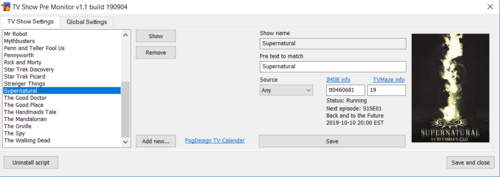
A mIRC script that monitors defined pre channels for your favorite TV shows and gives a notification when an episode is released online.
Installation
Put the file showmonitor.mrc wherever you wish. Preferably in a folder with write access.
Open your mIRC application, run the remote script editor, click file and then load.
Browse to where you put the file and load it. Bam, it's installed and ready to use.
Usage
After loading the script, right-click in any channel, query or status window and select TV Show Pre Monitor.
You can also type /showmon anywhere.
Edit the settings as needed. For more information on the various settings, check the help text at the bottom of the GUI while hovering over the part you want help with.
NOTE: You will require your own access to pre channels, no such information will be provided through this script.
0 downloads
(0 reviews)0 comments
Submitted
-
Download Statistics